Performance reviews take time, especially when managers have to pull together feedback, goals, and examples from across the review period and turn them into something worth reading. That work comes at a time when managers are already stretched. In an April 2026 Gartner survey, 47 percent of managers said they were working harder than they were a year earlier.
AI can help turn that scattered information into a clear, structured starting point. With the right AI prompts for performance reviews—and reliable data to ground them—managers can spend less time drafting and more time on the conversations that matter. In fact, managers using AI save an average of four hours across the review process. That creates more space for coaching, meaningful feedback, and career pathing, where human judgment and context remain essential.
This guide provides prompts for each stage of the review cycle, along with a practical framework that helps you adapt them to your performance management process. The goal is to use AI as a practical tool that reduces manual work, helps managers organize what they know, and supports more thoughtful, consistent reviews.
<< Download the full list of AI performance review prompts >>
Key insights
- AI prompts for performance reviews turn scattered notes and feedback into structured first drafts, cutting hours off manager prep time
- The best AI prompts for performance reviews include specific role context, raw performance data, a defined format, and clear tone guidance
- AI should draft language from data a manager provides, never invent achievements, and never replace the judgment needed for ratings or promotions
- Teams that pair AI prompts with a consistent review template write faster reviews without losing the specific feedback employees value
How to write effective AI prompts for performance reviews
A vague prompt like “Write a performance review for someone who did a good job” gives AI nothing to work with. Without detailed instructions, AI fills gaps with generic praise or unsupported details. That’s why every prompt here follows the same six-part formula:
- Role context: Tell the AI who you are and what you’re trying to accomplish: “You’re helping an HR business partner write a quarterly review for a senior product designer at a 200-person SaaS company.”
- Raw data: Paste in specifics: achievements, metrics, peer feedback, 1:1 notes, previous goals. The AI works with what you give it.
- Format requirements: Specify your review template, section headers, rating scale, and word limits.
- Tone and style: Spell it out: “Professional but warm. Specific, not generic.”
- Constraints: Set limits so the AI doesn’t make up information: “Do not fabricate achievements. Only reference data I’ve provided.” However, even with these instructions, fact-check the results.
- Output instructions: Say exactly how to deliver it: “Bullet points under each competency area, three to four sentences each.”
Here’s a detailed example of a good prompt:
“I’m a design manager at a 200-person SaaS company, and I need a first draft for our Q2 review cycle. Write a Q2 performance review for Priya, a senior product designer who led the checkout redesign (shipped two weeks early, increased conversion by 12 percent). Peer feedback highlighted her cross-functional communication. We use a five-point rating scale. Professional but supportive tone. Do not invent achievements. Structure the output as: Key accomplishments, Strengths, Growth areas, Goals for next quarter. Three to four sentences per section.”
This pattern holds across every prompt below: more context means less editing after. Real numbers and direct quotes from feedback give the AI real material to work with, so the draft reflects what the person actually did instead of generic praise.
<< Download the AI prompt template to make reviews easier >>
AI prompts for managers writing team member reviews
Most managers write reviews under deadline pressure: in a rush, from memory, with the most recent weeks clearest in their minds. The prompts below can help you use AI to turn scattered notes and historical data into a structured draft that you can review, refine, and make your own.
Prompts work best when the source material already sits in one place. HiBob’s talent management module brings goals, peer feedback, and previous reviews into the review itself, and its manager performance companion turns that context into an evidence-based first draft the manager can shape.
Prompts for highlighting achievements and strengths
Strong reviews make impact visible. Use these prompts to turn goals, metrics, project outcomes, and peer feedback into specific examples that show what a team member contributed and why it mattered.
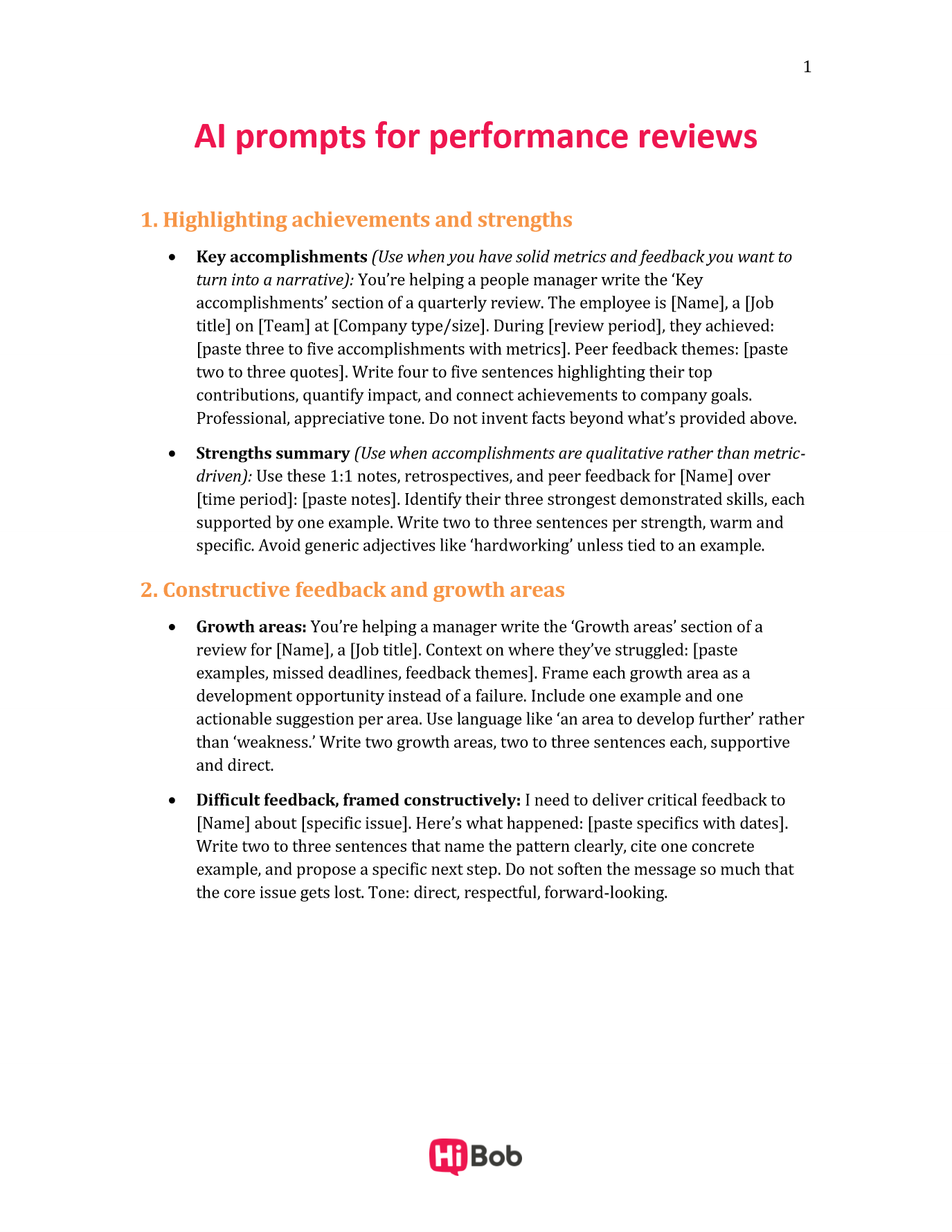
- Key accomplishments (Use when you have solid metrics and feedback you want to turn into a narrative): “You’re helping a people manager write the ‘Key accomplishments’ section of a quarterly review. The employee is [Name], a [Job title] on [Team] at [Company type/size]. During [review period], they achieved: [paste three to five accomplishments with metrics]. Peer feedback themes: [paste two to three quotes]. Write four to five sentences highlighting their top contributions, quantify impact, and connect achievements to company goals. Professional, appreciative tone. Do not invent facts beyond what’s provided above.”
- Strengths summary (Use when accomplishments are qualitative rather than metric-driven): “Use these 1:1 notes, retrospectives, and peer feedback for [Name] over [time period]: [paste notes]. Identify their three strongest demonstrated skills, each supported by one example. Write two to three sentences per strength, warm and specific. Avoid generic adjectives like ‘hardworking’ unless tied to an example.”
Prompts for constructive feedback and growth areas
Useful feedback is clear enough to act on and supportive enough to encourage growth. These prompts can help managers ground development areas in evidence, explain the impact, and suggest practical next steps without losing the human context.
- Growth areas: “You’re helping a manager write the ‘Growth areas’ section of a review for [Name], a [Job title]. Context on where they’ve struggled: [paste examples, missed deadlines, feedback themes]. Frame each growth area as a development opportunity instead of a failure. Include one example and one actionable suggestion per area. Use language like ‘an area to develop further’ rather than ‘weakness.’ Write two growth areas, two to three sentences each, supportive and direct.”
- Difficult feedback, framed constructively: “I need to deliver critical feedback to [Name] about [specific issue]. Here’s what happened: [paste specifics with dates]. Write two to three sentences that name the pattern clearly, cite one concrete example, and propose a specific next step. Do not soften the message so much that the core issue gets lost. Tone: direct, respectful, forward-looking.”
Prompts for performance improvement plans
Performance improvement plans need clarity, consistency, and measurable expectations. Use AI to help organize the facts and structure a first draft, but keep HR involved and make sure people remain accountable for the final decisions, language, and process.
- Performance gap and actionable plan: “Help me draft a performance improvement plan for [Name], a [Job title]. The performance gap is: [describe gap, with evidence: missed targets, quality issues, dates]. Structure the plan with: Performance gap (with evidence), Measurable improvement targets (specific, time-bound), Timeline (30/60/90-day checkpoints), Support and resources (training, tools), and Check-in cadence. Clear, factual, non-punitive language throughout.” (Use this as the starting structure for a formal PIP, then have HR and legal review it before it goes to the employee.)
AI prompts for performance management
AI can support first drafts of performance reviews and much more. With reliable data and clear human oversight, it can help HR teams and managers spot patterns, set stronger goals, and bring more consistency to performance decisions across the organization.
Prompts for analyzing performance data and trends
Performance data becomes more useful when managers can see the patterns behind individual comments and outcomes. These prompts can help summarize recurring themes, surface gaps, and turn large amounts of feedback into insights that people can review and act on.
Pasting feedback into a chat window handles one cycle at a time. The 360° performance review summary in HiBob surfaces recurring themes, strengths, and growth areas across reviewers, tied to company values and prior review history, so the pattern is there before the conversation starts.
- Synthesizing 360 feedback: “I’m pasting 360-degree feedback from five peers for [Name]: [paste feedback]. Identify the top three recurring themes, note contradictions between reviewers, and flag feedback that’s vague or lacks examples. Deliver as a table: Theme, Supporting evidence, Frequency, Suggested action.”
- Team-wide trends: “Here are self-assessments from my eight direct reports: [paste]. Identify common strengths, shared development gaps, and patterns in goal achievement versus misses. Recommend two to three team-level development priorities.”
Prompts for setting OKRs and performance goals
Clear goals give people a shared understanding of what success looks like. Use these prompts to translate business priorities into measurable objectives, connect individual goals to company outcomes, and adjust expectations as priorities change.
- SMART goals from priorities: “Generate three OKRs for a [Job title] at a [company type] entering Q3. Top priorities: [paste context]. Each OKR needs one objective and two to three measurable, time-bound key results. Align to these company-level OKRs: [paste]. Format as a table: Objective, Key results, Success metric, Deadline.”
- Mid-cycle recalibration: “Here are [Name]’s original Q2 goals: [paste], and progress to date: [paste]. Recommend which goals to keep, adjust, or replace. For adjusted goals, suggest specific revised targets.”
Prompts for consistency and reducing bias
AI can also act as a useful second check before managers finalize reviews. These prompts can help surface inconsistent standards, uneven language, and potential bias so managers can review their own judgment more critically.
These bias checks matter more as AI use scales: HiBob’s research on AI trust at work found that only 34 percent of individual contributors trust their company to train them in using AI responsibly, versus 59 percent of managers. A written AI policy closes some of that gap.
- Checking rating consistency: “I’m pasting the reviews I wrote for six direct reports: [paste all]. Check whether I’ve applied consistent standards: are similar achievement levels getting similar ratings? Am I using more positive language for some employees than others? Flag inconsistencies.”
- Detecting biased language: “Review this evaluation text for gendered language, recency bias, or vague feedback open to different interpretations: [paste text]. Suggest specific rewrites for flagged phrases.”
AI prompts for self-assessments and peer reviews
HR teams want to provide their people with a consistent, low-effort way to produce better assessments. These prompts work for individual contributors and for peers contributing feedback.
For self-assessments
Self-assessments work best when they connect specific contributions, lessons, and goals to the bigger picture rather than simply listing completed tasks.
- “I need to write my self-assessment for [review period]. My role is [title] at [company]. Key accomplishments: [paste bullets]. Goals I set at the start of the period: [paste]. Draft a self-assessment that quantifies my impact, connects achievements to company goals, and uses a confident but not boastful tone. Structure it as: Accomplishments, Challenges and learnings, Goals for next period. Four to five sentences per section.”
- “Help me write about a setback constructively. What happened: [describe it]. What I learned and changed as a result: [paste]. Write two to three sentences that own it honestly, without over-apologizing, and pivot to what I did differently.”
- “I’m building a case for promotion to [target level]. Evidence I’ve been operating at that level: [paste examples, scope changes, cross-team impact]. Write a two-paragraph summary connecting my work to the competencies expected at that level, using concrete examples over general claims.”
For peer reviews
Peer feedback adds context that managers may not see directly. These prompts can help co-workers turn day-to-day observations into specific, useful feedback that recognizes strengths and supports development.
- “Write specific, appreciative peer feedback for [Name] based on this project: [describe the collaboration and outcome]. Highlight one concrete example of a skill that made a difference and its impact on the team. Three to four sentences, warm and specific.”
- “Help me deliver constructive peer feedback to [Name] about [specific issue]. Context: [paste details]. Frame it as one example plus one suggestion, honest but preserving the relationship.”
Best practices for using ChatGPT and other LLMs for performance management
AI can reduce the manual work that goes into preparing reviews, but it should support the process rather than make decisions for people. Keep managers accountable for the final judgment, protect sensitive data, and use AI-generated content as a starting point for thoughtful, human-led conversations.
Review AI-generated content
AI gives you something like what writers refer to as a messy first draft. The human review—the personal knowledge and relationship context that only a manager has—is what makes a review land. Never send an AI draft without editing it line by line.
Protect team member data
Anonymize team member information before putting it into a public AI tool. Use placeholders like “Employee A,” and confirm with IT or legal which tools are approved for HR data.
Keep the feedback conversation in person
An AI draft can be preparation for the review itself. The conversation where a manager delivers feedback in real time is the critical human element that leads to behavior change. Treat the written review as notes to get ready for the meeting.
Recommended For Further Reading
Streamline your performance review process with thoughtful AI prompts
The right AI prompt won’t replace a manager’s judgment, but it can save time spent turning notes into a structured first draft. Start with the framework above, adapt the templates to your performance review format, and add clear guardrails for privacy and human review.
Prompts do more when the data behind them is already connected. Talent management in HiBob pairs reviews, goals, 1-on-1s, and surveys with AI companions that draft, summarize, and calibrate, while the judgment stays with your managers.
<< Put AI to work in your next performance review—download the full prompt list >>
ChatGPT AI prompts for HR FAQs
The same context-first formula applies to recruiting: Give the AI the role, the candidate’s background, and your evaluation criteria before asking for interview questions or a scorecard. Always have a human review AI-generated candidate assessments before they influence a hiring decision.
It can be, with guardrails. Never input identifiable team member or candidate data into a public AI tool without anonymizing it first and confirming the tool has enterprise-grade data governance. Bias is a real risk, since AI can replicate patterns from its training data, so AI-assisted evaluations need human review before they affect pay or hiring.
Follow the six-part framework in this guide: role context, raw data, format, tone, constraints, and output instructions. Specificity is the biggest lever. A prompt with real names, numbers, and quotes beats a generic request every time.
No. AI can draft language and flag inconsistencies, but it can’t build trust with a struggling team member or make the judgment calls that come from real relationships. HR professionals bring the empathy and relationship-building no model can replicate. The teams getting the most from AI use it to clear repetitive writing off their plates, freeing time for work only they can do.